一、引言
在企业协作工具向AI Agent化演进的大背景下,企业微信团队开源了wecom-cli——一个同时为人类用户和AI Agent设计的命令行工具。它以Rust为核心语言构建,通过MCP(Model Context Protocol)与企业微信云端服务通信;在命令结构上提供 6 个一级 CLI 品类,覆盖通讯录、待办、会议、消息、日程、文档/智能表格等核心业务能力,并内置 12 个 AI Agent Skills。
🔗 仓库地址:https://github.com/WecomTeam/wecom-cli
📜 语言构成:Rust 96.6% | JavaScript 3.4%
📦 开源协议:MIT License
本文将从整体架构、核心模块源码、安全机制、AI Agent Skills等维度,对wecom-cli进行全面的技术剖析。
二、整体架构概览
2.1 四层架构设计
wecom-cli采用了清晰的分层架构设计,自顶向下可分为四个层次:

┌──────────────────────────────────────────────────────────────┐
│  npm 分发层   @wecom/cli (Node.js Wrapper)                    │
│  bin/wecom.js → 平台检测 → 调用对应平台的 Rust 二进制         │
├──────────────────────────────────────────────────────────────┤
│  Rust CLI 核心层   (Tokio + Clap)                             │
│  main.rs → cmd/init | cmd/call → json_rpc → help/logging     │
├──────────────────────────────────────────────────────────────┤
│  安全与存储层                                                  │
│  auth (凭证管理) | crypto (AES-256-GCM) | mcp/config (缓存)  │
├──────────────────────────────────────────────────────────────┤
│  外部服务层   企业微信 MCP 云端服务                             │
│  qyapi.weixin.qq.com → tools/list | tools/call               │
└──────────────────────────────────────────────────────────────┘
设计亮点:
- 双语言协作:Node.js 作为分发层处理跨平台路由,Rust 作为核心层保证性能与安全
- 配置驱动的命令体系:子命令不是硬编码的,而是通过
config.rs动态注册,方便扩展新的业务品类 - 本地加密缓存:MCP配置和Bot凭证均通过AES-256-GCM加密存储,减少网络请求的同时保证安全
2.2 项目目录结构
wecom-cli/
├── bin/wecom.js              # Node.js 入口,平台检测与二进制路由
├── packages/                 # 跨平台预编译二进制
│   ├── darwin-arm64/         # macOS Apple Silicon
│   ├── darwin-x64/           # macOS Intel
│   ├── linux-x64/            # Linux 64位
│   └── win32-x64/            # Windows 64位
├── src/                      # Rust 核心源码
│   ├── main.rs               # 程序入口
│   ├── config.rs             # 业务品类定义
│   ├── constants.rs          # 常量与路径
│   ├── json_rpc.rs           # JSON-RPC 2.0 客户端
│   ├── help.rs               # 动态帮助系统
│   ├── logging.rs            # 日志系统
│   ├── fs_util.rs            # 原子文件写入
│   ├── cmd/                  # 命令处理
│   │   ├── init.rs           # 初始化凭证
│   │   └── call.rs           # 工具调用分发
│   ├── auth/                 # 认证模块
│   │   ├── mod.rs            # 凭证加密存储
│   │   └── protocol.rs       # Bot 数据结构
│   ├── crypto/               # 加密模块
│   │   ├── cipher.rs         # AES-256-GCM 加解密
│   │   └── keystore.rs       # 密钥管理 (Keyring/文件)
│   ├── mcp/                  # MCP 协议模块
│   │   ├── mod.rs            # URL 路由与请求ID生成
│   │   └── config.rs         # MCP 配置获取与缓存
│   └── media/                # 媒体处理
│       ├── mod.rs            # 媒体响应拦截
│       └── utils.rs          # MIME 检测与文件保存
├── skills/                   # AI Agent 技能定义
│   ├── wecomcli-lookup-contact/
│   ├── wecomcli-create-meeting/
│   ├── wecomcli-manage-doc/
│   └── ... (共12个)
├── Cargo.toml                # Rust 依赖配置
└── package.json              # npm 包配置
2.3 核心技术栈
| 技术 | 用途 | 版本 |
|---|---|---|
| Rust (Edition 2024) | 核心语言 | — |
| Tokio | 异步运行时 | 1.50.0 |
| Clap | 命令行解析 | 4.x |
| reqwest | HTTP 客户端 (rustls) | 0.13.2 |
| aes-gcm | AES-256-GCM 加密 | 0.10 |
| keyring | 操作系统密钥环 | 3.x |
| serde / serde_json | JSON 序列化 | 1.x |
| cliclack | 交互式终端 UI | 0.5 |
| tracing | 结构化日志 | 0.1 |
三、npm 分发层:Node.js 跨平台引导
3.1 设计策略
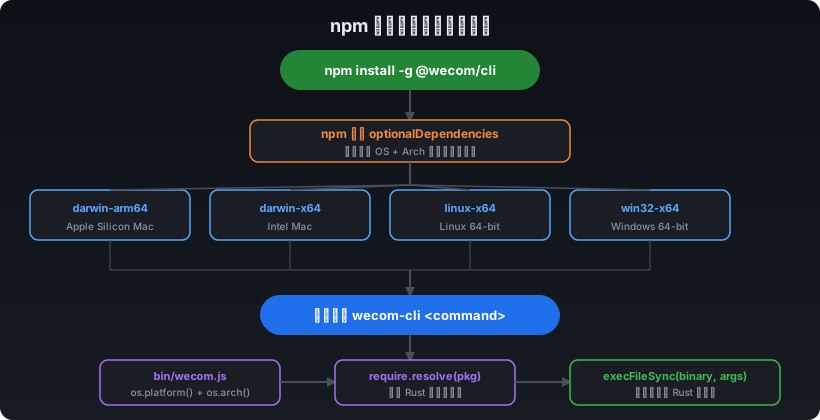
wecom-cli的分发采用了一种巧妙的npm + Rust二进制的混合策略:
- 主包
@wecom/cli是一个轻量的 Node.js 包,仅包含bin/wecom.js引导脚本 - 真正的 Rust 二进制以
optionalDependencies的形式按平台分包发布 - 安装时npm会根据当前平台自动下载对应的二进制包
{
  "name": "@wecom/cli",
  "bin": { "wecom-cli": "./bin/wecom.js" },
  "optionalDependencies": {
    "@wecom/cli-darwin-arm64": "0.1.1",
    "@wecom/cli-darwin-x64": "0.1.1",
    "@wecom/cli-linux-x64": "0.1.1",
    "@wecom/cli-win32-x64": "0.1.1"
  }
}
3.2 bin/wecom.js 引导逻辑
bin/wecom.js是整个CLI的入口,其职责非常明确——检测平台、定位二进制、透传执行:
// 1. 平台检测:os.platform() + os.arch() → 包名映射
function getPlatformPackage() {
  const platform = os.platform();  // darwin | linux | win32
  const arch = os.arch();          // arm64 | x64
  // 映射到 @wecom/cli-{platform}-{arch}
}

// 2. 二进制路径解析:require.resolve 查找预编译包
function getBinaryPath() {
  const pkgPath = require.resolve(`${pkg}/package.json`);
  const binName = process.platform === 'win32' ? 'wecom-cli.exe' : 'wecom-cli';
  return path.join(path.dirname(pkgPath), binName);
}

// 3. 透传执行:execFileSync 调用 Rust 二进制
execFileSync(binaryPath, process.argv.slice(2), { stdio: 'inherit' });
这种设计的优势在于:
- 用户无需安装 Rust 工具链
- npm的
optionalDependencies机制自动处理跨平台分发 - Node.js 层极轻量,仅做桥接
四、Rust CLI 核心层
4.1 程序入口 (main.rs)
main.rs是整个Rust应用的入口点,基于tokio异步运行时,核心流程为:环境加载 → 动态生成子命令 → 路由分发。
#[tokio::main]
async fn main() -> Result<()> {
    // 1. 加载 .env 环境变量
    dotenvy::dotenv().ok();

    // 2. 初始化日志
    logging::init_logging();

    // 3. 从 config.rs 获取业务品类,动态生成子命令
    let categories = config::get_categories();

    // 4. 构建 CLI 应用
    let app = Command::new("wecom-cli")
        .subcommand(Command::new("init")...);  // 内置 init 命令

    // 动态添加品类命令
    for cat in &categories {
        app = app.subcommand(Command::new(cat.name).about(cat.description)...);
    }

    // 5. 命令分发
    match matches.subcommand() {
        Some(("init", m))      => cmd::init::handle_init_cmd(m).await,
        Some((category, m))    => cmd::call::handle_call_cmd(category, m).await,
        _ => anyhow::bail!("未知命令"),
    }
}
关键设计点:
- 动态命令生成:子命令并非硬编码,而是从
config::get_categories()动态获取。这意味着在 CLI 路由层扩展一级品类时,改动主要集中在品类配置与后端能力接入,而不必重写整套分发逻辑 - 异步优先:使用
#[tokio::main]宏,所有I/O操作均为异步执行
4.2 配置驱动的品类系统 (config.rs)
#[derive(Debug, Clone)]
pub struct CategoryInfo {
    pub name: &'static str,
    pub description: &'static str,
}

pub fn get_categories() -> Vec<CategoryInfo> {
    vec![
        CategoryInfo { name: "contact",  description: "通讯录 — 成员查询和搜索" },
        CategoryInfo { name: "doc",      description: "文档 — 文档/智能表格创建和管理" },
        CategoryInfo { name: "meeting",  description: "会议 — 创建/管理/查询视频会议" },
        CategoryInfo { name: "msg",      description: "消息 — 聊天列表、发送/接收消息" },
        CategoryInfo { name: "schedule", description: "日程 — 日程增删改查和可用性查询" },
        CategoryInfo { name: "todo",     description: "待办事项 — 创建/查询/编辑待办项" },
    ]
}
每个品类(category)在MCP后端对应一个独立的服务URL,实现了业务域隔离。
4.3 命令调用核心 (cmd/call.rs)
这是整个CLI最核心的文件,负责将用户的命令行输入转换为JSON-RPC请求发送到MCP后端:
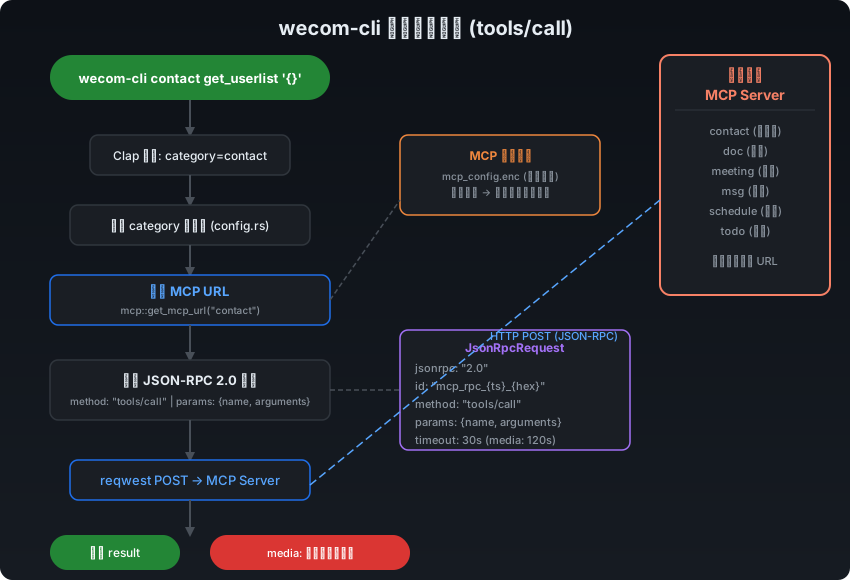
pub async fn handle_call_cmd(category_name: &str, matches: &ArgMatches) -> Result<()> {
    // 1. 参数解析:method + args + help
    let args = CallArgs::from_arg_matches(matches)?;

    // 2. 校验品类有效性
    if !config::get_categories().iter().any(|c| c.name == category_name) {
        anyhow::bail!("未知的命令品类: {}", category_name);
    }

    // 3. 交互式引导:缺少参数时自动显示帮助
    if args.help || args.method.is_none() {
        help::show_category_tools(category_name).await?;
        return Ok(());
    }

    // 4. 构建 JSON-RPC 请求
    let method = args.method.unwrap();
    let params = serde_json::from_str(&args.args.unwrap_or("{}".into()))?;

    // 5. 特殊超时处理:媒体下载设置 120s
    let timeout = if method == "get_msg_media" { Some(120_000) } else { None };

    // 6. 发送 JSON-RPC 请求
    let response = json_rpc::send(category_name, "tools/call",
        Some(json!({ "name": method, "arguments": params })),
        timeout
    ).await?;

    // 7. 媒体拦截:对 get_msg_media 进行特殊处理
    let response = if method == "get_msg_media" {
        media::intercept_media_response(response).await?
    } else {
        response
    };

    // 8. 输出结果
    println!("{}", response["result"]);
    Ok(())
}
亮点分析:
- 渐进式交互:缺少method时显示品类工具列表,缺少args时显示工具帮助——对人类用户非常友好
- 媒体拦截机制:
get_msg_media返回的base64媒体数据会被自动解码并保存到本地,响应中替换为本地文件路径 - 差异化超时:普通请求30s超时,媒体下载120s超时
五、JSON-RPC 2.0 通信层
5.1 请求协议 (json_rpc.rs)
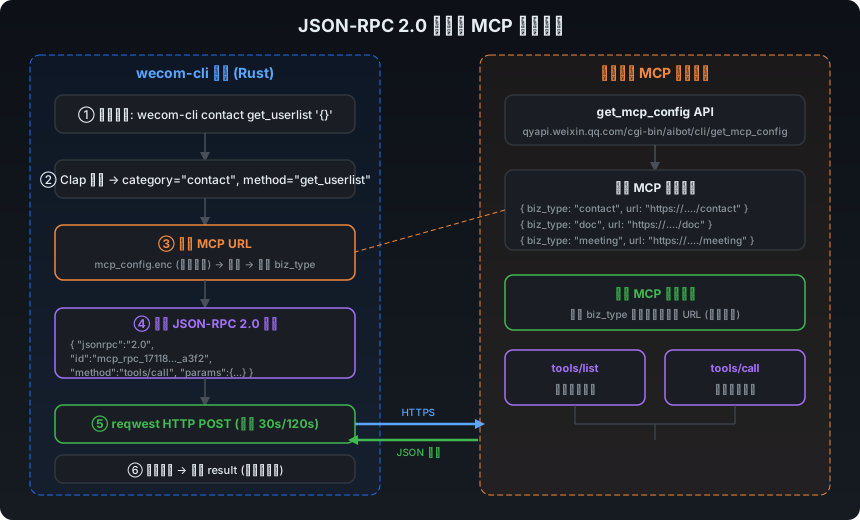
wecom-cli通过标准的JSON-RPC 2.0协议与企业微信MCP后端通信:
#[derive(Debug, Clone, Serialize)]
struct JsonRpcRequest {
    jsonrpc: &'static str,  // 固定 "2.0"
    id: String,              // 唯一请求标识
    method: String,          // RPC 方法名 (tools/list | tools/call)
    params: Option<Value>,   // 可选参数
}

pub async fn send(
    category: &str,
    method: &str,
    params: Option<Value>,
    timeout_ms: Option<i32>,
) -> Result<Value> {
    // 1. 获取该品类对应的 MCP URL
    let url = mcp::get_mcp_url(category).await?;

    // 2. 构建请求
    let req = JsonRpcRequest {
        jsonrpc: "2.0",
        id: mcp::gen_req_id("mcp_rpc"),  // 格式: mcp_rpc_{timestamp}_{hex}
        method: method.to_string(),
        params,
    };

    // 3. 发送 HTTP POST (默认30s超时)
    let timeout = Duration::from_millis(timeout_ms.unwrap_or(30_000) as u64);
    let resp = reqwest::Client::new()
        .post(&url)
        .json(&req)
        .timeout(timeout)
        .send()
        .await?;

    // 4. 解析响应
    let text = resp.text().await?;
    Ok(serde_json::from_str(&text)?)
}
5.2 请求ID生成策略
pub fn gen_req_id(prefix: &str) -> String {
    let timestamp = SystemTime::now()
        .duration_since(UNIX_EPOCH)
        .unwrap()
        .as_millis();
    let random_hex = generate_random_hex(4);  // 8位十六进制
    format!("{prefix}_{timestamp}_{random_hex}")
}
// 示例: mcp_rpc_1711814400000_a3f2b1c9
使用前缀 + 毫秒时间戳 + 随机hex的组合,确保分布式环境下的请求唯一性。
5.3 MCP URL 动态路由 (mcp/mod.rs)
pub async fn get_mcp_url(category: &str) -> Result<String> {
    let configs = config::get_mcp_config().await?;
    for item in &configs {
        if item.biz_type == category {
            return Ok(item.url.clone());
        }
    }
    anyhow::bail!("当前企业暂不支持 {} 命令", category);
}
每个业务品类通过独立的 MCP 服务 URL 完成路由,体现出按业务域拆分的后端接入方式。
六、安全机制深度剖析
wecom-cli在安全方面的设计非常严谨,体现了工业级CLI工具的安全意识。
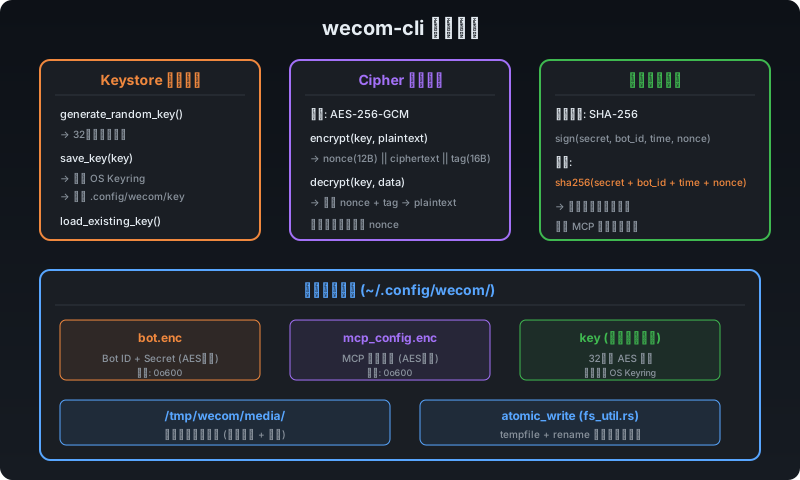
6.1 凭证加密存储 (auth + crypto)
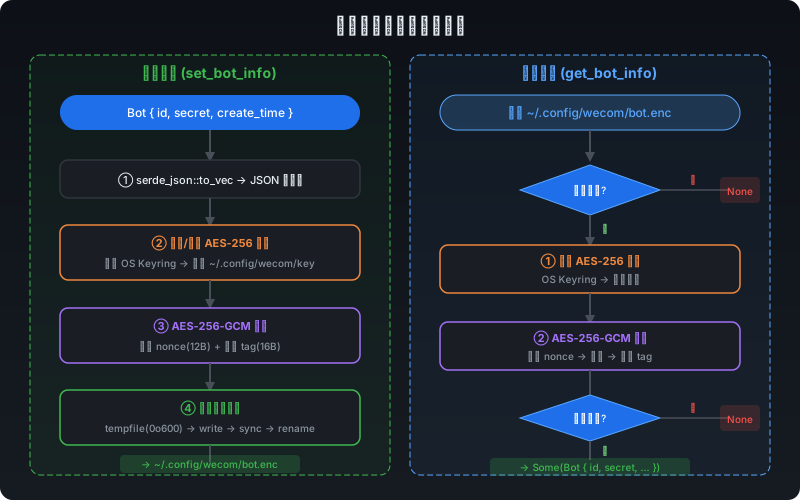
用户的Bot ID和Secret是敏感信息,wecom-cli采用了三层安全保护:
第一层:AES-256-GCM 对称加密
// cipher.rs - 加密
pub fn encrypt(key: &[u8; 32], plaintext: &[u8]) -> Result<Vec<u8>> {
    let cipher = Aes256Gcm::new(Key::<Aes256Gcm>::from_slice(key));
    let nonce = Aes256Gcm::generate_nonce(&mut OsRng);  // 随机96位nonce
    let ciphertext = cipher.encrypt(&nonce, plaintext)?;
    // 输出格式: nonce(12B) || ciphertext || tag(16B)
    let mut out = nonce.to_vec();
    out.extend(ciphertext);
    Ok(out)
}

// cipher.rs - 解密
pub fn decrypt(key: &[u8; 32], data: &[u8]) -> Result<Vec<u8>> {
    // 最小长度校验: nonce(12) + tag(16) = 28
    if data.len() < NONCE_SIZE + TAG_SIZE { bail!("数据损坏"); }
    let (nonce_bytes, ciphertext) = data.split_at(NONCE_SIZE);
    let cipher = Aes256Gcm::new(Key::<Aes256Gcm>::from_slice(key));
    cipher.decrypt(nonce_bytes.into(), ciphertext)
}
核心要点:
- 每次加密使用随机Nonce,相同明文产生不同密文,防止频率分析
- AES-GCM自带认证标签(tag),篡改检测内置
- 密文格式
nonce || ciphertext || tag紧凑高效
第二层:操作系统密钥环优先
// keystore.rs
pub fn save_key(key: &[u8; 32]) -> Result<()> {
    // 优先尝试 OS Keyring (macOS Keychain / Linux Secret Service)
    if keyring::Entry::new("wecom-cli", "master-key")?
        .set_secret(key).is_ok() {
        return Ok(());
    }
    // 回退:写入文件 ~/.config/wecom/key (权限 0o600)
    fs_util::atomic_write(&key_path, key, Some(0o600))
}
第三层:原子写入 + 严格权限
// fs_util.rs
pub fn atomic_write(path: &Path, data: &[u8], mode: Option<u32>) -> Result<()> {
    // 1. 在同目录创建临时文件(确保同一文件系统)
    let mut tmp = NamedTempFile::new_in(parent)?;

    // 2. 先设置权限(避免权限窗口期)
    #[cfg(unix)]
    if let Some(m) = mode {
        tmp.as_file().set_permissions(Permissions::from_mode(m))?;
    }

    // 3. 写入 + flush + sync
    tmp.write_all(data)?;
    tmp.as_file().flush()?;
    tmp.as_file().sync_all()?;

    // 4. 原子重命名到目标路径
    tmp.persist(path)?;
    Ok(())
}
关键安全策略:
- 先设权限后写内容,避免"权限窗口期"——即内容已写入但权限尚未设置的瞬间
- 使用
tempfile + rename保证原子性,断电或崩溃不会产生半写文件 - 所有敏感文件统一
0o600权限(仅所有者可读写)
6.2 MCP 请求签名验证
与MCP后端的通信采用SHA-256签名认证:
// mcp/config.rs
fn sign(secret: &str, bot_id: &str, time: &str, nonce: &str) -> String {
    sha256_hex(&format!("{secret}{bot_id}{time}{nonce}"))
}

// 请求结构
struct GetMcpConfigRequest {
    bot_id: String,
    time: String,      // Unix 时间戳
    nonce: String,      // 随机数
    signature: String,  // sha256(secret + bot_id + time + nonce)
}
签名公式:signature = SHA256(secret + bot_id + timestamp + nonce),通过时间戳和随机数防止重放攻击。
6.3 本地存储布局
~/.config/wecom/
├── bot.enc           # Bot 凭证 (AES-256-GCM 加密, 0o600)
├── mcp_config.enc    # MCP 配置缓存 (AES-256-GCM 加密, 0o600)
└── key               # AES 密钥文件 (回退方案, 0o600)

/tmp/wecom/media/     # 媒体文件临时存储
└── *.png/*.jpg/...   # 去重 + 原子写入
七、初始化流程详解
7.1 wecom-cli init 全流程
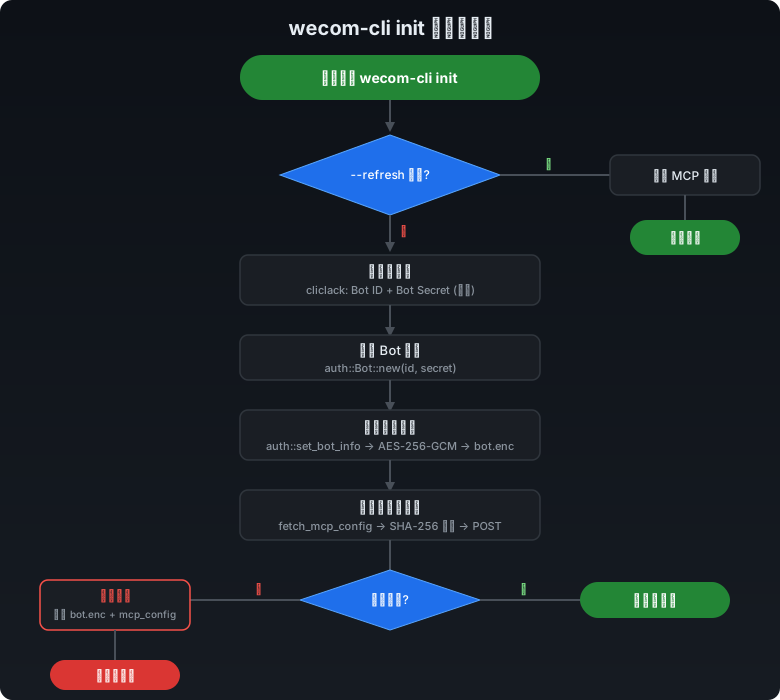
// cmd/init.rs
pub async fn handle_init_cmd(matches: &ArgMatches) -> Result<()> {
    let args = InitArgs::from_arg_matches(matches)?;

    // 快速刷新模式
    if args.refresh {
        mcp::config::fetch_mcp_config().await?;
        println!("MCP 配置已刷新");
        return Ok(());
    }

    // 交互式输入(使用 cliclack 库)
    let bot_id = if let Some(id) = args.bot_id {
        id
    } else {
        cliclack::input("请输入 Bot ID").interact()?
    };
    let secret = cliclack::password("请输入 Bot Secret").interact()?;

    // 创建 Bot 对象并持久化
    let bot = auth::Bot::new(bot_id, secret);
    auth::set_bot_info(&bot)?;

    // 验证凭证有效性
    let spinner = cliclack::spinner();
    spinner.start("正在验证凭证...");

    match mcp::config::fetch_mcp_config().await {
        Ok(_) => {
            spinner.stop("凭证验证成功");
            cliclack::outro("初始化完成 ✅")?;
        }
        Err(e) => {
            spinner.stop("凭证验证失败");
            // 回滚:清除已存储的凭证和配置
            auth::clear_bot_info();
            mcp::config::clear_mcp_config();
            cliclack::outro("初始化失败 ❌")?;
            return Err(e);
        }
    }
    Ok(())
}
设计亮点:
- 交互式 UI:使用
cliclack提供美观的终端交互(输入框、密码隐藏、加载动画),用户体验优秀 - 验证后存储:先存储再验证,验证失败则回滚清除,保证凭证状态一致性
- 快速刷新:
--refresh参数支持仅刷新MCP配置,无需重新输入凭证
7.2 MCP 配置获取与缓存
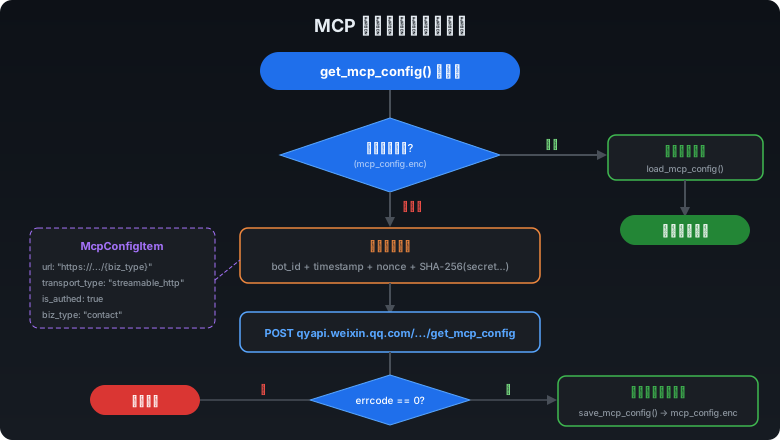
// mcp/config.rs
pub async fn get_mcp_config() -> Result<Vec<McpConfigItem>> {
    // 优先从本地加密缓存加载
    if let Ok(cached) = load_mcp_config() {
        return Ok(cached);
    }
    // 缓存未命中,从服务器拉取
    fetch_mcp_config().await
}

pub async fn fetch_mcp_config() -> Result<Vec<McpConfigItem>> {
    let resp = fetch_mcp_config_from_server().await?;
    // 加密并缓存到本地
    save_mcp_config(&resp)?;
    Ok(resp)
}
配置缓存策略:本地优先 → 远程兜底,减少网络请求,提升命令执行速度。
八、媒体处理模块
8.1 媒体响应拦截 (media/mod.rs)
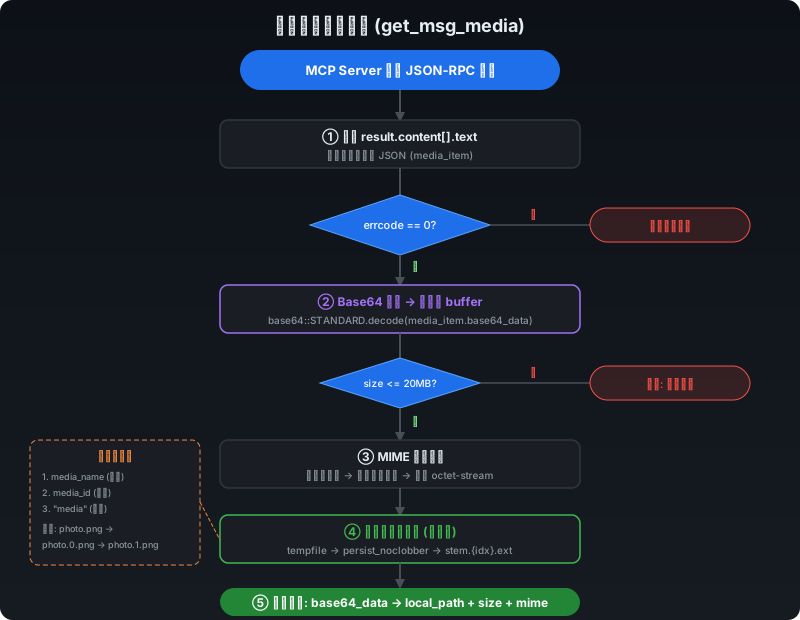
当调用get_msg_media获取聊天媒体时,响应中包含base64编码的媒体数据。wecom-cli会自动拦截并处理:
pub async fn intercept_media_response(res: Value) -> Result<Value> {
    // 1. 提取 MCP 响应中的 content[].text 字段
    let biz_data: Value = serde_json::from_str(text)?;

    // 2. 校验业务响应 (errcode == 0)
    if biz_data["errcode"].as_i64() != Some(0) { return Ok(res); }

    // 3. 解码 base64 数据
    let buffer = base64::STANDARD.decode(base64_data)?;

    // 4. 大小校验 (最大 20MB)
    if buffer.len() > 20 * 1024 * 1024 { bail!("媒体文件过大"); }

    // 5. 检测 MIME 类型
    let content_type = utils::detect_mime(media_name, &buffer);

    // 6. 原子保存到本地 (带去重)
    let file_path = utils::save_media(media_name, media_id, &content_type, &buffer).await?;

    // 7. 构建精简响应:移除 base64_data,添加 local_path
    Ok(json!({
        "result": { "content": [{ "type": "text", "text": json!({
            "errcode": 0, "errmsg": "ok",
            "media_item": {
                "local_path": file_path,
                "size": buffer.len(),
                "content_type": content_type
            }
        })}]}
    }))
}
8.2 智能文件保存 (media/utils.rs)
媒体文件保存包含三个关键能力:
MIME 类型检测(双重策略):
pub fn detect_mime(file_name: Option<&str>, buffer: &[u8]) -> String {
    // 策略1:文件扩展名推断
    if let Some(name) = file_name {
        let mime = mime_guess::from_ext(ext).first_or_octet_stream();
        if mime != APPLICATION_OCTET_STREAM { return mime.to_string(); }
    }
    // 策略2:魔术字节检测
    if let Some(kind) = infer::get(buffer) {
        return kind.mime_type().to_string();
    }
    "application/octet-stream".to_string()
}
文件名去重机制:
pub async fn save_media(...) -> Result<PathBuf> {
    // 原子写入临时文件
    let mut tmp = NamedTempFile::new_in(&dir)?;
    tmp.write_all(data)?;
    tmp.as_file().sync_all()?;

    // 首先尝试原始文件名
    let target = dir.join(make_file_name(&stem, None, &ext));
    match tmp.persist_noclobber(&target) {
        Ok(_) => return Ok(target),
        Err(e) if e.error.kind() == AlreadyExists => { /* 继续去重 */ }
    }

    // 文件已存在:尝试 stem.0.ext, stem.1.ext, ..., stem.100.ext
    for idx in 0..100 {
        let target = dir.join(make_file_name(&stem, Some(idx), &ext));
        // persist_noclobber 保证无覆盖的原子操作
    }
}
九、日志系统
9.1 双输出日志架构 (logging.rs)
pub fn init_logging() {
    let stderr_filter = env::var("WECOM_CLI_LOG_LEVEL").ok();
    let log_file_dir = env::var("WECOM_CLI_LOG_FILE").ok();

    // Stderr 层:人类可读格式
    let stderr_layer = stderr_filter.map(|filter| {
        tracing_subscriber::fmt::layer()
            .with_writer(std::io::stderr)
            .compact()                        // 紧凑格式
            .with_filter(EnvFilter::new(filter))
    });

    // 文件层:JSON 行格式 + 按日轮转
    let file_layer = log_file_dir.map(|dir| {
        let file_appender = tracing_appender::rolling::daily(dir, "ww.log");
        tracing_subscriber::fmt::layer()
            .json()                           // JSON 结构化
            .with_writer(non_blocking)        // 非阻塞写入
    });

    // 组合层级
    let subscriber = registry.with(stderr_layer).with(file_layer);
    tracing::subscriber::set_global_default(subscriber).ok();
}
设计特点:
- 按需启用:只有设置了环境变量才激活日志,默认静默运行
- 双通道输出:stderr 输出人类可读格式,文件输出 JSON 结构化格式
- 非阻塞写入:文件日志使用
non_blocking,不影响主业务性能 - 按日轮转:通过
tracing_appender::rolling::daily实现日志文件自动轮转
十、动态帮助系统
10.1 远程工具发现 (help.rs)
wecom-cli的帮助系统并不是静态文本,而是通过JSON-RPC动态从MCP后端获取工具列表:
pub async fn show_category_tools(category: &str) -> Result<()> {
    // 通过 tools/list 接口获取该品类的工具列表
    let response = json_rpc::send(category, "tools/list", None, None).await?;

    // 缓存到 thread_local 避免重复请求
    TOOLS_CACHE.with(|cache| {
        cache.borrow_mut().insert(category.to_string(), tools.clone());
    });

    // 打印品类信息和工具列表
    println!("品类: {} - {}", cat.name, cat.description);
    for tool in &tools {
        println!("  {} - {}", tool["name"], tool["description"]);
    }
}

pub async fn show_tool_help(category: &str, tool_name: &str) -> Result<()> {
    // 优先从缓存读取,未命中则远程拉取
    // 打印工具名称、描述、输入参数 Schema
}
亮点:
- 在既有品类范围内,工具列表和帮助信息可随服务端能力动态刷新,减少仅为帮助信息发布新 CLI 版本的需要
thread_local!缓存避免同一会话内重复网络请求
十一、AI Agent Skills 系统
11.1 Skills 设计理念
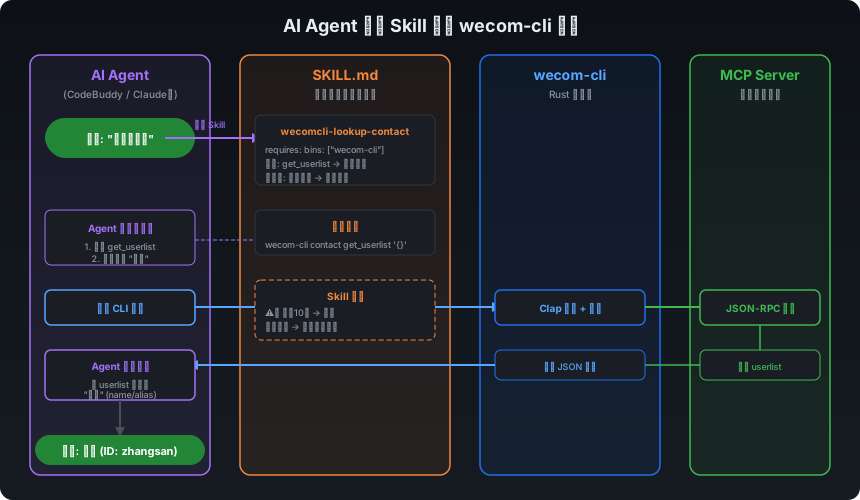
wecom-cli内置了12个SKILL.md技能定义文件,这些文件不是代码,而是结构化的自然语言指令,供AI Agent理解如何调用CLI命令:
skills/
├── wecomcli-lookup-contact/SKILL.md      # 通讯录查询
├── wecomcli-create-meeting/SKILL.md      # 创建会议
├── wecomcli-edit-meeting/SKILL.md        # 编辑会议
├── wecomcli-get-meeting/SKILL.md         # 获取会议
├── wecomcli-edit-todo/SKILL.md           # 编辑待办
├── wecomcli-get-todo-detail/SKILL.md     # 待办详情
├── wecomcli-get-todo-list/SKILL.md       # 待办列表
├── wecomcli-get-msg/SKILL.md             # 获取消息
├── wecomcli-manage-doc/SKILL.md          # 管理文档
├── wecomcli-manage-schedule/SKILL.md     # 管理日程
├── wecomcli-manage-smartsheet-data/SKILL.md   # 智能表格数据
└── wecomcli-manage-smartsheet-schema/SKILL.md # 智能表格结构
11.2 SKILL.md 文件结构
以wecomcli-lookup-contact为例,每个Skill文件包含以下关键部分:
---
name: wecomcli-lookup-contact
description: 通讯录成员查询技能,获取当前用户可见范围内的通讯录成员
metadata:
  requires:
    bins: ["wecom-cli"]      # 依赖的二进制
  cliHelp: "wecom-cli contact --help"  # CLI帮助入口
---

# 通讯录成员查询技能

## 操作
### 1. 获取全量通讯录成员
**调用示例:**
wecom-cli contact get_userlist '{}'

**返回格式:**
{ "errcode": 0, "userlist": [{ "userid": "zhangsan", "name": "张三" }] }

### 2. 按姓名/别名搜索人员
- 精确匹配 → 直接使用
- 模糊匹配 → 返回候选列表
- 无结果 → 告知用户

## 注意事项
- ⚠️ 超过10人时接口报错
- userid 是唯一标识

## 典型工作流
### 工作流1:查询人员信息
用户问:"帮我查一下 Sam 是谁?"
1. 调用 get_userlist 获取全量成员
2. 本地筛选匹配
3. 展示结果
设计精妙之处:
- YAML Front Matter:包含元数据(依赖、帮助入口),便于AI Agent解析
- 操作指令:提供精确的命令行示例和参数格式
- 返回格式说明:帮助Agent理解和解析API响应
- 典型工作流:提供端到端的使用场景,减少Agent的"思考"成本
- 注意事项:明确边界条件和异常处理策略
这种设计让AI Agent无需理解底层API文档,仅通过阅读SKILL.md就能正确操作企业微信。
十二、关键设计模式总结
12.1 设计模式概览
| 设计模式 | 应用位置 | 效果 |
|---|---|---|
| 配置驱动 | config.rs → main.rs | 新增品类无需改动路由代码 |
| 策略模式 | media/utils.rs | MIME 检测:扩展名 → 魔术字节 → 默认值 |
| 拦截器模式 | media/mod.rs | 透明处理媒体响应,调用者无感 |
| 缓存优先 | mcp/config.rs | 本地加密缓存 → 远程兜底 |
| 分层安全 | auth + crypto | Keyring → 文件 → AES-256-GCM |
| 原子操作 | fs_util.rs | tempfile + rename 防数据损坏 |
| 渐进式交互 | cmd/call.rs | 缺参自动展示帮助,而非报错 |
12.2 工程实践亮点
- Rust Edition 2024:采用最新Rust版本,享受语言层面的安全保证
- 全异步架构:Tokio驱动的异步I/O,适合网络密集型场景
- 零拷贝分发:npm的optionalDependencies机制,用户只下载对应平台的二进制
- 防御式编程:随处可见的长度校验、空值处理、回滚机制
- 完善的测试:cipher.rs、fs_util.rs等核心模块均有覆盖率良好的单元测试
十三、总结
wecom-cli是一个设计精良的企业级CLI工具,它展示了如何用Rust构建安全、高性能的命令行应用,同时通过AI Agent Skills桥接了人类用户和AI Agent的使用场景。
核心技术亮点回顾:
- Rust + Node.js 混合分发:性能与分发便利性的最佳平衡
- JSON-RPC 2.0 + MCP:标准化的远程调用协议,品类独立路由
- 三层安全保护:OS Keyring + AES-256-GCM + 原子写入 + 0o600权限
- SKILL.md 技能系统:结构化自然语言显著降低了 AI Agent 接入企业微信的提示工程成本
- 配置驱动的可扩展架构:在既有路由框架下扩展品类时,主要改动集中在配置与能力接入层
对于企业级CLI工具的开发者而言,wecom-cli在安全存储、跨平台分发、AI Agent适配等方面的实践,都值得深入学习和借鉴。
参考链接:
- GitHub 仓库:https://github.com/WecomTeam/wecom-cli
- MCP (Model Context Protocol):https://spec.modelcontextprotocol.io
- JSON-RPC 2.0 规范:https://www.jsonrpc.org/specification
「真诚赞赏,手留余香」
 爱折腾的工程师
真诚赞赏,手留余香
使用微信扫描二维码完成支付