一、引言:提示词工程不是玄学,而是一套可复用的工程学
原文链接:Claude Prompting Best Practices 出品方:Anthropic 官方文档 适用模型:Claude Opus 4.7 / 4.6、Claude Sonnet 4.6、Claude Haiku 4.5
很多团队在接入 Claude 之后的第一印象是:“同样的提示词,有时效果惊艳,有时却漂移得离谱。“这种不稳定感往往被归结为"模型的随机性”,但 Anthropic 官方的 Prompting Best Practices 给出了一个完全不同的视角:大多数稳定性问题的根因,在于我们没有把"和 Claude 说话"当作一项工程化任务来做。
这份官方文档把提示词工程拆成六个互相支撑的维度——通用原则、输出格式、工具使用、思考与推理、代理系统,以及针对 Claude Opus 4.7 的专属技巧。本文会沿着这条主线,结合具体示例和配图,逐层解读每一类最佳实践的工程含义,并重点说明 Opus 4.7 带来的一系列行为变化对现有提示词的影响。
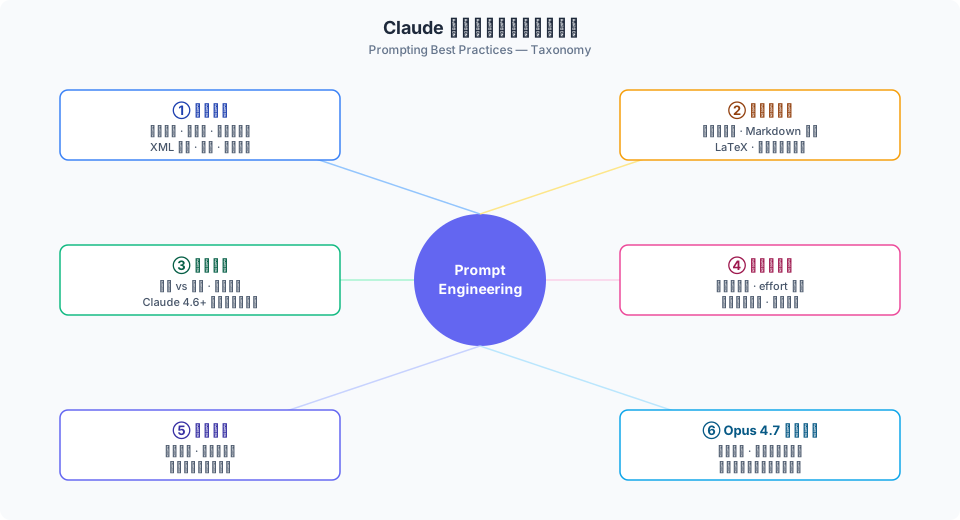
图注:作者基于原文梳理的知识体系分类图,非 Anthropic 官方分层。
需要强调一点:本文尽量贴近原文的事实与示例,但所有结构图、对比图都是作者为讲解目的绘制的概念示意,不代表 Anthropic 的官方架构定义。
二、通用原则:五条可以贴墙上的底层规律
2.1 黄金法则——把 Claude 当作"缺上下文的新同事”
原文开篇给出了一个非常朴素但极具工程价值的判断标准:
把你的提示词拿给一位对任务缺乏背景的同事看,如果他看完感到困惑,那么 Claude 也会困惑。
这条黄金法则的含义是,模型并不是在"猜"你的意图,而是在"拼接"你给出的线索。线索不足,就只能退回到某种通用默认;线索充分,输出质量才会稳定。
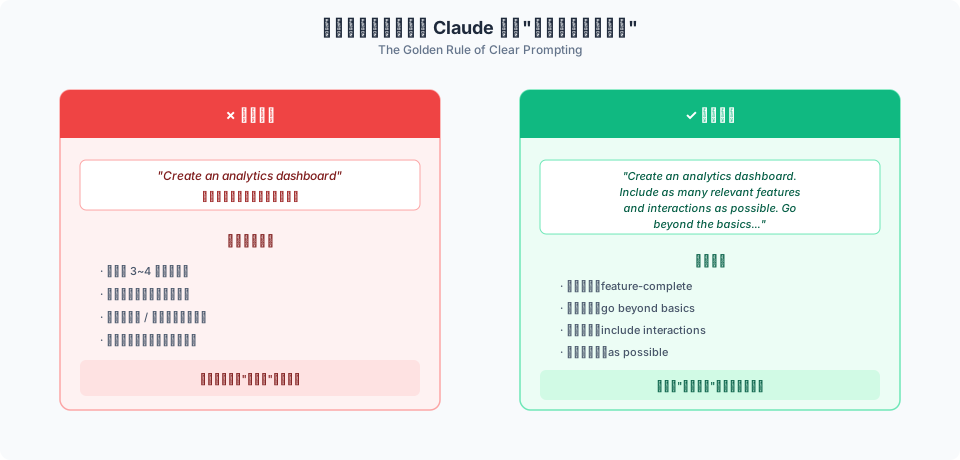
以文档里的 “analytics dashboard” 示例来看差别:
- 模糊版:
Create an analytics dashboard - 清晰版:
Create an analytics dashboard. Include as many relevant features and interactions as possible. Go beyond the basics to create a fully-featured implementation.
第二条提示词并没有多出什么"魔法词",它只是把"什么叫完成"定义得更具体——要尽量多的相关特性、要交互元素、要超越基础版。这就是把"隐性标准"变成"显性标准"。
2.2 为"为什么"提供理由,不只是"做什么"
文档里另一个被反复强调的原则是:给指令附上动机。比如同样是禁止使用省略号,下面两种写法效果差距很大:
- 效果较差:
NEVER use ellipses - 效果更好:
Your response will be read aloud by a text-to-speech engine, so never use ellipses since the text-to-speech engine will not know how to pronounce them.
第二个版本多出来的不是"语气",而是因果链。模型理解了"为什么不能用省略号"之后,能够把这条规则推广到其他类似场景——例如避免连续破折号、避免异常 Unicode 符号等。对提示词工程来说,说清楚"因为"能显著提升规则的泛化能力。
2.3 Few-shot 示例——3~5 个、相关、多样、结构化
示例是提示词工程里性价比最高的杠杆之一,但它不是"多多益善"。原文给出的经验是:
- 相关:贴近你真实的输入分布,而不是挑一些"好看但罕见"的样本
- 多样:覆盖边缘情况,让模型理解规则的边界在哪里
- 结构化:用
<example>标签包裹,避免与指令语义混在一起
数量上,3~5 个示例通常效果最佳。更多示例会拉长上下文、稀释指令,也会让模型倾向于过拟合到具体样本,反而降低泛化能力。
2.4 用 XML 标签结构化提示
对于稍微复杂一点的提示词,XML 标签几乎是必选项。它的作用不是"美化",而是给模型一棵可以解析的文档树——让模型清楚地知道:哪一段是指令、哪一段是数据、哪一段是输出样例。
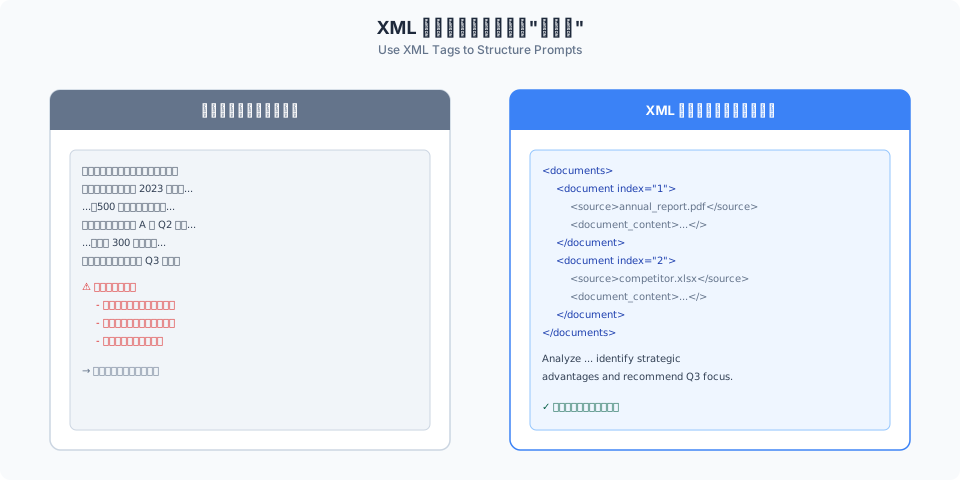
一个多文档分析任务的典型写法:
<documents>
  <document index="1">
    <source>annual_report_2023.pdf</source>
    <document_content>
      {{ANNUAL_REPORT}}
    </document_content>
  </document>
  <document index="2">
    <source>competitor_analysis_q2.xlsx</source>
    <document_content>
      {{COMPETITOR_ANALYSIS}}
    </document_content>
  </document>
</documents>

Analyze the annual report and competitor analysis. Identify strategic
advantages and recommend Q3 focus areas.
几条关于 XML 使用的经验:
- 标签名要一致且有语义——
<instructions>、<context>、<example>这类; - 有自然层级时再嵌套,没必要的层级只会增加噪音;
- 重要字段前后的空白行会提升可读性,也让模型更容易识别边界。
2.5 给 Claude 一个角色
system prompt 里的角色设定,不是"扮演的噱头",而是一种先验上下文。它会影响模型的词汇选择、判断尺度和默认假设。
import anthropic

client = anthropic.Anthropic()

message = client.messages.create(
    model="claude-opus-4-7",
    max_tokens=1024,
    system="You are a helpful coding assistant specializing in Python.",
    messages=[
        {"role": "user", "content": "How do I sort a list of dictionaries by key?"}
    ],
)
角色设定越贴近真实岗位(“Python coding assistant”、“SRE on-call engineer”),模型的回答越稳定;反过来,过于戏剧化的设定(“你是世界上最好的黑客”)往往会引入不可控的语气漂移。
三、长上下文:把文档放顶部,把问题放末尾
当你给 Claude 一份几万 token 的长文档时,提示词的"排版顺序"会直接影响回答质量。原文给出的经验是:
- 长文档放在提示词顶部;
- 查询和指令放在末尾;
- 这种排版相比"问题在前、文档在后"的写法,在原文中的报告可以带来最多约 30% 的质量提升。
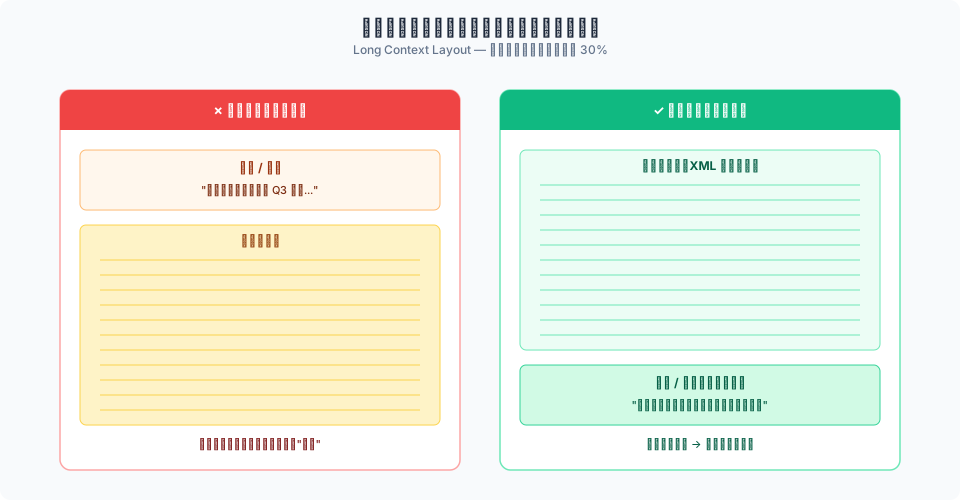
从工程视角看,这个现象并不反直觉:模型是自回归生成的,越靠近生成位置的 token,对输出的影响权重越大。把指令放末尾,相当于在模型即将回答的位置"再提醒一次目标"。
结合长上下文场景,原文还给出两条配套建议:
- 用 XML 标签包装每份文档的元数据和正文(来源、日期、标题),便于模型引用;
- 要求模型先提取相关引用,再回答——相当于一个隐式的 chain-of-thought,显著降低幻觉。
请先用 <relevant_quotes> 标签列出你引用的原文片段,
再在 <answer> 标签中给出你的回答。
四、输出与格式:控制"模型想多说什么"
Claude 最新一代模型(4.6 / 4.7)在风格上变得更直接、更基于事实、更少冗长。这是一个重要的信号:很多此前用来"压制啰嗦"的提示词,现在反而可能让输出过度收紧。
4.1 控制冗长度:用正面示例代替负面指令
原文明确建议,当你想要简洁输出时:
Provide concise, focused responses. Skip non-essential context, and keep examples minimal.
比 Do not be verbose, do not add unnecessary fluff 这样的负面指令更有效。正面示例告诉模型"要长成什么样",负面指令只告诉模型"不要长成什么样",前者约束更紧。
4.2 抑制过度 Markdown
Claude 默认倾向于使用较多 Markdown(粗体、斜体、项目符号)。在一些需要"散文感"的场景(长篇报告、正式文档),可以用下面这段 system prompt 片段:
<avoid_excessive_markdown_and_bullet_points>
When writing reports, documents, technical explanations, analyses, or any
long-form content, write in clear, flowing prose using complete paragraphs
and sentences. Use standard paragraph breaks for organization and reserve
markdown primarily for `inline code`, code blocks, and simple headings.
Avoid using **bold** and *italics*.

DO NOT use ordered lists or unordered lists unless: a) you're presenting
truly discrete items where a list format is the best option, or b) the user
explicitly requests a list or ranking
</avoid_excessive_markdown_and_bullet_points>
4.3 迁移离开"预填充响应"
这是一个容易被忽略、但在产品侧影响很大的变化:
从 Claude 4.6 以及 Claude Mythos Preview 开始,不再支持在最后一个 assistant 回合做预填充响应(prefilled response)。
对常见用法,原文给出的迁移路线如下:
| 场景 | 迁移方式 |
|---|---|
| 控制输出格式 | 改用 Structured Outputs 或工具调用 |
| 消除冗余序言 | 在 system prompt 里用直接指令控制 |
| 避免误拒绝 | 直接用清晰的 user 消息提示 |
| 继续之前的响应 | 把"请继续"放进 user 消息 |
| 上下文保持 | 通过 user 消息或工具注入提醒 |
这条变化对依赖预填充做格式锁定的系统影响最大,迁移时建议优先考虑 Structured Outputs——它从协议层保证了 JSON Schema 级别的结构稳定性,比传统的 prefill 更可靠。
五、effort 参数:用"思考档位"代替反复改提示词
Claude Opus 4.7 引入了一个极其关键的设计:effort 参数。它不是另一个采样温度,而是一个对模型内部"思考深度"的显式开关。
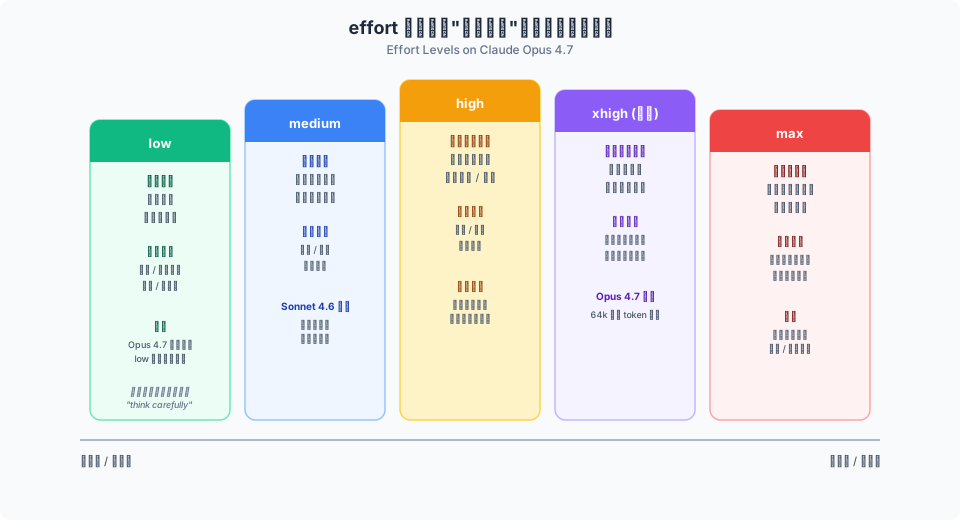
原文给出了 5 个档位的定位:
max:极限努力,适合智能要求最高的任务,但有过度思考的风险;xhigh(Opus 4.7 新增):编码和代理类用例的最佳设置;high:平衡 token 使用和智能,大多数智能敏感场景的最低推荐;medium:成本敏感场景的默认;low:适合短小任务和对延迟敏感的高并发工作负载。
5.1 “严格遵循档位"带来的新陷阱
Opus 4.7 与 4.6 相比,有一个很容易踩坑的行为变化:
Opus 4.7 会严格遵循 effort 档位,特别是在低端。
这意味着,在 4.6 时代用 low 依然能跑得动的推理任务,到 4.7 可能直接"想都不想”。处理方式有两种:
- 把 effort 提到
high或xhigh,这是最直接的手段; - 若因为延迟 / 成本必须维持
low,就在提示词里显式要求推理:
This task involves multi-step reasoning. Think carefully through the problem before responding.
5.2 自适应思考:从预算式迁移到 adaptive
Claude Opus 4.6 和 Sonnet 4.6 同时还支持 自适应思考(thinking: {type: "adaptive"})。它让模型动态决定何时、多深地思考,省去了手动设置 budget 的调参成本。
从预算式迁移到自适应思考的写法:
# 旧:固定 budget 的扩展思考
client.messages.create(
    model="claude-sonnet-4-5-20250929",
    max_tokens=64000,
    thinking={"type": "enabled", "budget_tokens": 32000},
    messages=[{"role": "user", "content": "..."}],
)

# 新:自适应思考 + effort
client.messages.create(
    model="claude-opus-4-7",
    max_tokens=64000,
    thinking={"type": "adaptive"},
    output_config={"effort": "high"},
    messages=[{"role": "user", "content": "..."}],
)
一个工程上的经验:当你开启 max 或 xhigh 时,建议把 max_tokens 预算设到 64k,避免长推理被截断在关键一步。
5.3 避免过度思考
另一个被原文点名的问题是"过度彻底"——模型前期花大量 token 在探索不必要的分支。原文推荐用下面这段提示抑制:
When you're deciding how to approach a problem, choose an approach and commit
to it. Avoid revisiting decisions unless you encounter new information that
directly contradicts your reasoning.
以及这段在不需要深度推理时的提示:
Extended thinking adds latency and should only be used when it will meaningfully
improve answer quality - typically for problems that require multi-step reasoning.
When in doubt, respond directly.
此外,原文提到一个小但实用的细节:禁用扩展思考时,Opus 4.5 对"think"一词特别敏感,可以考虑用 consider、evaluate、reason through 等替代词。
六、工具使用:让 Claude 真的"动手",而不是只说建议
这是一个经常被低估的细节:Claude 会非常严格地按动词行事。
6.1 行动 vs 建议
以下两句在大多数人看来几乎同义,但在 Claude 那里差别巨大:
Can you suggest some changes to improve this function?→ 只会给出建议Change this function to improve its performance.→ 直接修改函数
对 agent 场景,原文提供了两个可以直接贴到 system prompt 的块:
偏向"默认动手":
<default_to_action>
By default, implement changes rather than only suggesting them. If the user's
intent is unclear, infer the most useful likely action and proceed, using tools
to discover any missing details instead of guessing.
</default_to_action>
偏向"保守询问":
<do_not_act_before_instructions>
Do not jump into implementation or changes files unless clearly instructed to
make changes. When the user's intent is ambiguous, default to providing
information, doing research, and providing recommendations rather than taking action.
</do_not_act_before_instructions>
选择哪种,取决于产品场景的可逆性要求——对 IDE 里的代码修改倾向于"动手",对生产环境的运维操作倾向于"保守"。
6.2 并行工具调用
另一个高 ROI 的工程手段是让模型并行调用工具。当多个调用之间没有依赖关系时(比如同时读三个文件),一次下发三个调用比串行依次读快数倍。
<use_parallel_tool_calls>
If you intend to call multiple tools and there are no dependencies between
the tool calls, make all of the independent tool calls in parallel. For example,
when reading 3 files, run 3 tool calls in parallel. Maximize use of parallel
tool calls where possible to increase speed and efficiency. However, if some
tool calls depend on previous calls, do NOT call these tools in parallel.
</use_parallel_tool_calls>
需要注意的是,Claude 4.5 / 4.6 对 system prompt 的响应变得更敏感——一些过于激烈的写法(如 CRITICAL: You MUST ...)可能引起"过度触发"。原文的建议是,把这类语气收敛为 Use this tool when ... 这种更中性的条件式指令。
七、代理系统:长时间任务的四个治理点
对于长周期的 agent 工作流(研究、多文件重构、跨系统自动化),提示词工程的重点从"单次问答"转向循环治理。
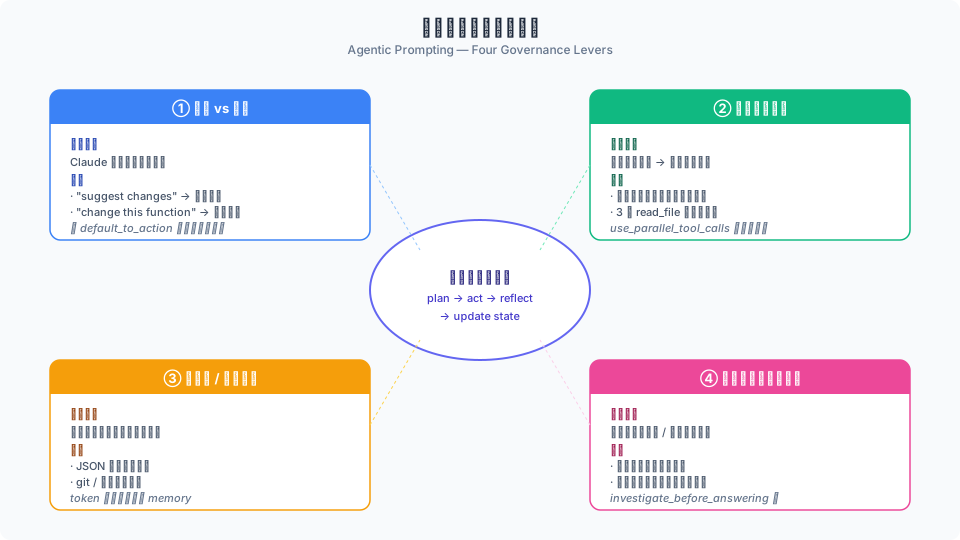
7.1 上下文与状态跟踪
Claude 4.6 / 4.5 具备上下文感知能力——它能感知自己剩余的 token 预算。这带来一个很实用的提示模式:
Your context window will be automatically compacted as it approaches its limit,
allowing you to continue working indefinitely. Therefore, do not stop tasks
early due to token budget concerns. As you approach your token budget limit,
save your current progress and state to memory before the context window refreshes.
配合工程侧的几条最佳实践:
- 结构化状态用 JSON(便于模型读回、写回);
- 进度笔记用自由文本 + 时间戳;
- 用 git 或文件系统做长期持久化;
- 提示词里强调增量进度,避免重做。
7.2 平衡自主性与安全性
另一条被原文明确点出的治理原则是:“不同动作,有不同的审慎等级”。
Consider the reversibility and potential impact of your actions. You are
encouraged to take local, reversible actions like editing files or running
tests, but for actions that are hard to reverse, affect shared systems, or
could be destructive, ask the user before proceeding.

Examples of actions that warrant confirmation:
- Destructive operations: deleting files or branches, dropping database tables, rm -rf
- Hard to reverse operations: git push --force, git reset --hard
- Operations visible to others: pushing code, commenting on PRs/issues
这段提示本质上是在把可逆性作为一种分级信号注入到代理的决策循环。它和传统的 “ask for confirmation before X” 不同之处在于——它给了模型一个可以泛化判断新情况的原则,而不是枚举所有需要确认的动作。
7.3 子代理编排
如果发现子代理被过度使用(每个小子任务都要派发一个子代理),可以用下面这段收紧:
Use subagents when tasks can run in parallel, require isolated context, or
involve independent workstreams. For simple tasks, sequential operations,
single-file edits, or tasks where you need to maintain context across steps,
work directly rather than delegating.
反过来,如果 Opus 4.7 默认不肯派发子代理(它比 4.6 更克制),可以显式补充:
Do not spawn a subagent for work you can complete directly in a single response.
Spawn multiple subagents in the same turn when fanning out across items or reading multiple files.
7.4 抑制幻觉和过度工程
幻觉的典型症状是"没读过文件就回答"。用这段可以显著降低:
<investigate_before_answering>
Never speculate about code you have not opened. If the user references a
specific file, you MUST read the file before answering. Never make any
claims about code before investigating unless you are certain.
</investigate_before_answering>
过度工程的典型症状是模型自作主张去改无关代码、加注释、加类型标注。收紧方式:
Avoid over-engineering. Only make changes that are directly requested or clearly necessary.

- Scope: Don't add features, refactor code, or make "improvements" beyond what was asked.
- Documentation: Don't add docstrings, comments, or type annotations to code you didn't change.
- Defensive coding: Don't add error handling for scenarios that can't happen.
- Abstractions: Don't create helpers for one-time operations.
还有一条对"应付测试"的常见反模式的约束:
Please write a high-quality, general-purpose solution. Do not create helper
scripts or workarounds. Implement a solution that works correctly for all
valid inputs, not just the test cases. Do not hard-code values.
八、Claude Opus 4.7 专属行为变化速查
Opus 4.7 相比 4.6 的行为变化比较多,单独列一张速查图便于迁移对照:
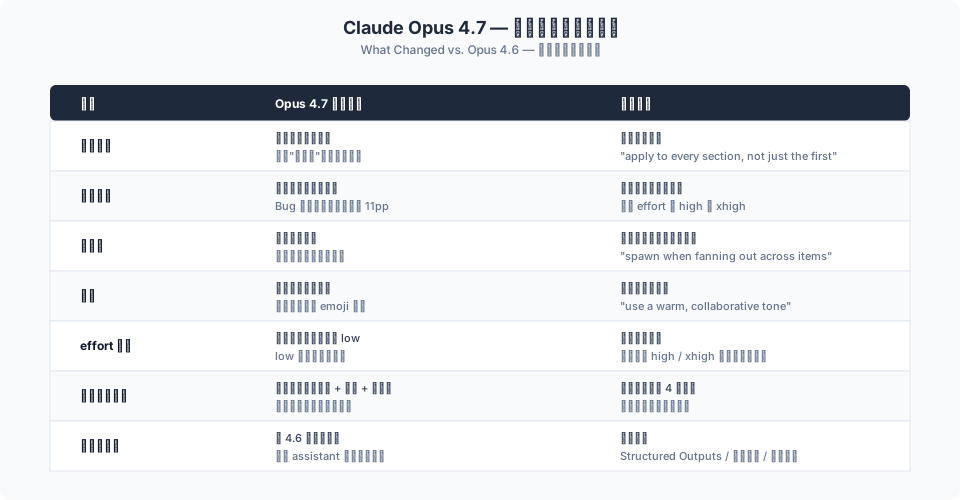
几个值得单独强调的点:
- 指令更字面化:需要广泛应用某条规则时,要显式写"apply to every section, not just the first one";
- 工具使用更克制,但 bug 检出率反而更高(代码审查召回率 +11pp)——这意味着在代码审查场景里,要主动提醒模型"不要过早过滤严重性":
Report every issue you find, including ones you are uncertain about or consider
low-severity. Do not filter for importance or confidence at this stage - a separate
verification step will do that. Your goal here is coverage: it is better to surface
a finding that later gets filtered out than to silently drop a real bug.
- 前端默认风格明显:Opus 4.7 有一套一致的"家族风格"(米色底
#F4F1EA+ Georgia / Fraunces 等衬线字体 + 赤陶色强调),如果你不想要这种默认,要么给出具体替代规格,要么让模型先提 4 个不同方向再选择:
Before building, propose 4 distinct visual directions tailored to this brief
(each as: bg hex / accent hex / typeface — one-line rationale).
Ask the user to pick one, then implement only that direction.
- 避免"AI slop"美学:以下这段前端 aesthetics 提示可以贴进 system prompt:
<frontend_aesthetics>
NEVER use generic AI-generated aesthetics like overused font families (Inter, Roboto,
Arial, system fonts), cliched color schemes (particularly purple gradients on white
or dark backgrounds), predictable layouts and component patterns, and cookie-cutter
design that lacks context-specific character. Use unique fonts, cohesive colors and
themes, and animations for effects and micro-interactions.
</frontend_aesthetics>
对于交互式编码产品(类似 IDE 里的 AI 助手),原文的总建议是:effort 用 xhigh 或 high,开启自动模式等自主功能,首次对话中尽可能一次讲清任务、意图和约束。这条经验对减少"反复让用户确认"的体验问题非常有效。
九、工程实践建议:一个可以直接照抄的迁移清单
基于原文的迁移指南,我整理了一份从 4.5/4.6 升级到 4.7 的实操清单,适合团队直接作为 checklist 使用:
- 显式说明行为期望:任何隐式约束都补成显式(“apply to every section”);
- 把固定 thinking budget 迁到 adaptive + effort:更省心,也更贴合 4.7 的动态思考特性;
- 优先把智能敏感任务升到
high/xhigh:比反复改提示词更有效; - 迁移离开 prefilled response:优先用 Structured Outputs 或工具调用;
- 收敛反懒惰提示:4.6+ 模型已经更主动,老的"请不要偷懒"类提示可能过度触发;
- 检视子代理生成策略:如果你依赖模型主动 fan-out,需要显式写条件;
- 覆盖前端默认审美:要么给规格,要么走"先提方案再实现"的两步流程;
- 对长上下文任务:文档靠前、指令末尾、用 XML 结构化、要求先引用后回答;
- 对 agent 任务:加上"状态持久化"和"行动可逆性"这两块提示;
- 保持一个评估集:任何提示词变更都跑一遍固定样本,避免"改一个好一个坏一个"。
这份清单有两条隐含前提:
- 提示词工程的稳定性来自测量,不来自灵感。没有固定评估集的情况下,任何"似乎变好了"的改动都是幻觉;
- effort 参数值得优先于提示词调整——它是更粗但更可靠的杠杆。只有在 effort 无法解决的问题上,再去调提示词细节。
十、结语:把提示词当作"接口契约"来维护
回头看 Anthropic 的 Prompting Best Practices,贯穿全文的其实是一个很朴素的观念:提示词不是一次性的"咒语",而是一份需要持续维护的接口契约。
- 它有输入契约:你提供什么样的上下文、数据和示例;
- 它有输出契约:你期望什么样的格式、冗长度和完成标准;
- 它有行为契约:你允许模型动什么、不能动什么、什么时候必须问;
- 它还有演化契约:当模型升级时(4.6 → 4.7),哪些写法需要随之调整。
把这四层契约都写清楚,你就能让 Claude 像一位合格的工程同事一样在不确定的边界内稳定工作——这正是"把提示词工程化"的真正含义。
随着 Claude 的模型能力持续迭代,很多今天需要靠提示词小心治理的问题(比如过度思考、子代理滥用、风格漂移),未来会有更多被下放到 API 层的显式参数(effort、adaptive thinking、structured outputs 等)去解决。对于开发者来说,最好的策略不是追逐每一个"新技巧",而是把通用原则、XML 结构化、effort 调优、agent 治理这几套核心能力内化为日常工程习惯——这比任何一条"万能提示词"都更长期有效。
参考链接
- Claude Prompting Best Practices(原文)
- Extended Thinking 与 Adaptive Thinking 官方说明
- Structured Outputs 官方文档
声明:本文所有图表均为作者为讲解目的整理的概念示意图,非 Anthropic 官方原图;文中代码片段与提示词示例忠实取自原文,中文翻译与解读由作者完成,若与官方文档存在差异,请以官方文档为准。
「真诚赞赏,手留余香」
 爱折腾的工程师
真诚赞赏,手留余香
使用微信扫描二维码完成支付